People may recognise that your video was created with AI. That is not the real problem.
The problem is when the video feels generic, disconnected and empty. It may contain polished visuals, a smooth synthetic voice and dramatic music, yet leave the viewer with nothing useful to remember.
That usually happens because generation began before the thinking was complete.
An AI video generator can produce a shot. It cannot decide why the shot belongs in your story, what your audience already knows, which claim needs evidence or what should be removed from the final edit. Those are creative decisions, and someone still has to make them.
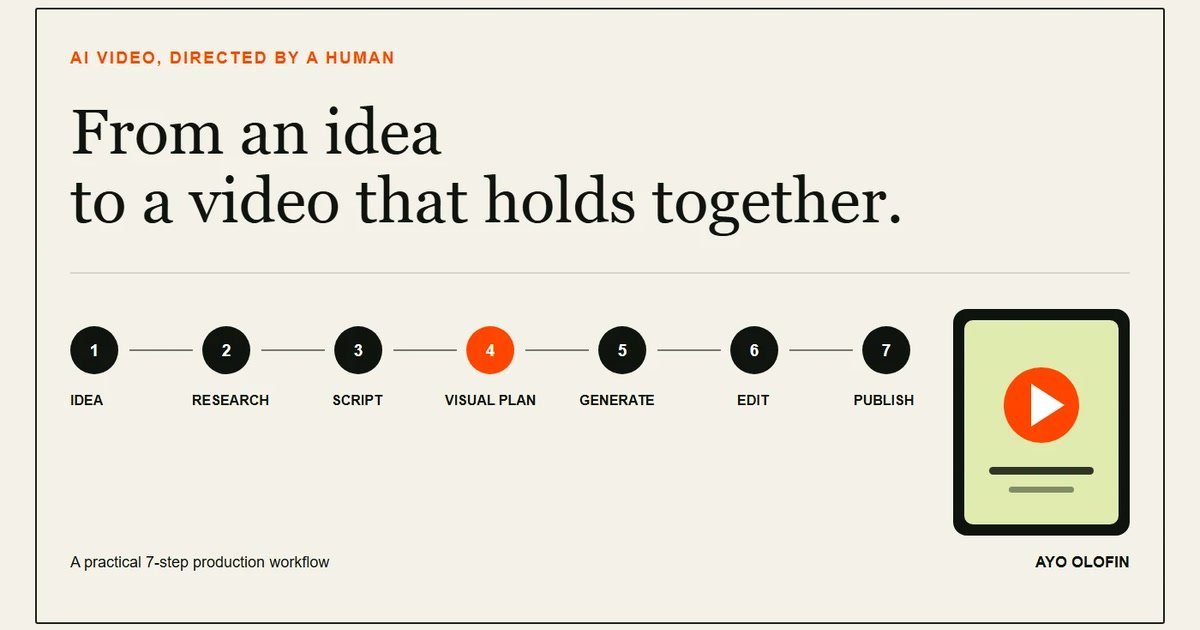
This guide explains how to create AI videos through a seven-step production workflow. It works whether you are making educational content, a business video, a product demonstration or a short visual story.
The goal is not to hide the use of AI. The goal is to direct it well.
What counts as an AI video?
An AI video does not have to be completely generated from text.
AI may help with one stage or several stages of production:
- finding and organising ideas;
- researching a subject;
- developing a script;
- creating a storyboard or shot list;
- generating images, video clips or backgrounds;
- producing a voice-over;
- removing noise or correcting audio;
- creating captions;
- finding pauses, repeated words or weak sections during editing.
A face-to-camera video with AI-assisted captions is one form of AI-assisted production. A fully generated short film is another. Most useful business and educational content will sit somewhere between those two extremes.
This matters because the phrase AI video often encourages people to search for one application that will complete the entire job. That is usually the wrong starting point. A dependable result comes from connecting several creative decisions into a repeatable process.
Why so many AI videos feel random
Randomness is normally a planning failure before it becomes a generation failure.
A creator starts with a broad instruction such as, "Create an inspiring video about entrepreneurship." The model has no specific audience, situation, argument or visual sequence. It fills those gaps with common patterns: a person staring through an office window, a busy city, a laptop, a handshake and a sunrise.
Each shot may look acceptable on its own. Together, they do not form a convincing idea.
Three problems usually create this effect.
The message is too broad
"Productivity," "success" and "marketing" are subjects, not video ideas. A useful idea identifies a person, a situation and a change in understanding.
The scenes were generated independently
If the subject, clothing, setting, light and camera language change with every prompt, the viewer has to keep rebuilding the world of the video. That makes even attractive scenes feel unrelated.
The first output was treated as the final product
Generation is not approval. A first output is material for review. It may contain physical errors, strange movement, factual inaccuracies, broken continuity or a visual that simply does not serve the message.
AI can reduce the cost of producing options. It does not remove the responsibility to choose well.
Step 1: Define the audience and the outcome
Before you write a prompt, complete this sentence:
By the end of this video, this specific viewer should understand, feel or do something they could not clearly understand, feel or do before.
That sentence forces three decisions.
- Who is the viewer? "Business owners" is better than "everyone." "A small-business owner who struggles to publish consistently" is better still.
- What problem are you addressing? Choose one problem that can be explained within the available time.
- What is the outcome? Decide whether the viewer should understand an idea, learn a process, trust a person or take an action.
Consider the difference between these two ideas.
Weak: How businesses can use AI.
Focused: How a small-business owner can turn five customer questions into five educational videos.
The focused version already suggests the audience, problem, demonstration and result. Better production begins with better definition.
Step 2: Research before you generate
AI can help you collect questions, compare explanations and organise notes. It can also produce a confident statement that is wrong.
Separate your research into three groups:
- Facts: claims that can be checked against reliable sources;
- Experience: what you have personally observed, tested or done;
- Interpretation: the conclusion you draw from the facts and experience.
This distinction improves both accuracy and voice. The factual sections become defensible. The personal sections sound like you because they come from your work rather than from a generic model response.
For factual subjects, begin with primary sources: official documentation, company announcements, published research, regulations or first-party data. Use secondary reporting to add context, not to replace the original evidence.
If the video concerns health, finance, law, elections, public safety or a real person's reputation, apply a much higher verification standard. A visually persuasive falsehood is still a falsehood.
I use the same principle when writing about the future and commercial impact of AI: separate what has happened from what I think it means.
Step 3: Write a script that sounds spoken
A written article and a spoken video do not move at the same speed.
Long sentences that work on a page can become difficult to follow when heard once. Write for the ear.
A practical short-video script has three parts:
- Hook: establish the problem or value of the video quickly;
- Body: deliver the explanation, demonstration or story;
- Close: leave the viewer with a conclusion or next step.
This is not only a creator convention. TikTok's own creative guidance recommends a hook, body and close, with the value of the content communicated early. The structure works because it respects the viewer's need to know why the next minute deserves attention.
Use AI to challenge and improve the script, but do not hand over authorship. Ask it to identify vague claims, unnecessary repetition or missing transitions. Then rewrite the result in words you would actually say.
Read the script aloud. If you run out of breath, simplify the sentence. If a phrase feels unnatural in your mouth, replace it. If the conclusion repeats the opening without adding anything, strengthen the lesson.
For most educational videos, one clear point is enough. Trying to teach seven unrelated lessons in sixty seconds usually produces speed without understanding.
Step 4: Turn the script into visible beats
Do not generate visuals for paragraphs. Break the script into moments the viewer can see.
For each line, ask:
- Should the viewer see me saying this?
- Would a screen recording prove it better?
- Is a generated scene necessary to illustrate it?
- Would simple text be clearer?
- Can the current visual remain on screen without losing attention?
A simple shot list can contain five columns:
- spoken line;
- visual;
- duration;
- audio or sound;
- source of the asset.
Suppose the script says, "Start with the questions your customers already ask." The strongest visual may be a real list of customer questions or a screen recording of messages with private information removed. A cinematic clip of someone typing in a dark room would add atmosphere but provide less evidence.
Use generated visuals where they clarify, illustrate or make an impossible shot possible. Do not use them merely because the generator is available.
Step 5: Write visual prompts for continuity
A useful video prompt describes more than the subject.
Google's official Veo prompting guidance recommends breaking the idea into components. The exact controls vary between tools, but the underlying discipline is transferable.
Define the following where they matter:
- Subject: who or what is visible;
- Action: what changes during the shot;
- Setting: where and when it happens;
- Composition: wide shot, close-up, overhead view or another framing;
- Camera: static, handheld, slow push or another movement;
- Lighting: natural window light, hard daylight, soft studio light or another choice;
- Style: documentary, commercial, illustrated or another visual language;
- Constraints: details that must not change or appear.
Here is a weak prompt:
A business owner making content with AI.
Here is a more directed version:
Medium close-up of a Nigerian skincare business owner in her early thirties, seated at the same cream desk in a bright Lagos studio. She reviews three customer questions on her phone, writes one answer in a notebook and looks thoughtful rather than excited. Natural window light from the left, restrained documentary colour, static camera, realistic movement, vertical composition.
For the next shot, keep the character description, clothing, desk, direction of light and overall colour language consistent. Change only the action and framing.
A reference image or character sheet can help when the tool supports it. Even then, inspect every result. Continuity is an editing decision as much as a prompting technique.
Step 6: Generate only what the plan requires
Unlimited generation can become a form of procrastination.
If the shot list requires six assets, begin with those six. Name every file according to its position in the sequence. Keep versions together. Record why you rejected a result when the same error keeps returning.
A practical folder might look like this:
- 01-hook;
- 02-problem;
- 03-demonstration;
- 04-result;
- 05-close;
- audio;
- captions;
- exports.
Generate one shot, review it against the plan and correct the prompt before moving forward. This is slower than pressing generate twenty times, but faster than discovering during editing that none of the clips belong together.
Review generated assets for:
- faces, hands and body movement;
- text appearing inside the scene;
- logos and brand elements;
- changes in clothing or identity;
- objects entering or disappearing;
- physical movement that does not make sense;
- details that could misrepresent a real person, place or event.
Do not use another person's voice or likeness without permission. Disclosure does not create consent.
Step 7: Edit, check and publish
The edit is where generated assets become a video.
Start by arranging the message, not by adding effects. Remove any scene that repeats the point, interrupts continuity or looks impressive without helping the viewer.
Then review five layers.
Story
Does the opening create a fair reason to continue? Does the body fulfil that promise? Does the conclusion complete the idea?
Picture
Are the subject, direction, light and visual style consistent? Are there distracting generation errors? Does every visual support the spoken line?
Sound
Can the voice be understood comfortably on a phone speaker? Is the music helping rather than competing? Are changes in volume distracting?
Text
Are captions accurate and readable? Are names, figures and technical terms spelled correctly? Is important text positioned away from interface controls?
Truth and permission
Are factual claims supported? Do you have permission for every voice, face, clip, photograph and piece of music? Does the platform require an altered or synthetic-content disclosure?
YouTube requires creators to disclose realistic content that has been meaningfully altered or synthetically generated. Its guidance distinguishes that from minor production assistance such as help with scripts, captions, colour correction or audio repair. Platform rules change, so check the current policy where you publish.
For vertical social video, frame the project for the destination rather than cropping as an afterthought. TikTok recommends vertical 9:16, high-resolution footage and space for its interface. Meta similarly recommends vertical video, quality audio and keeping important elements inside the Reels safe zone.
Export a clean master, watch it once without stopping and then watch it again with the sound off. The first review tests flow. The second tests whether the visual story and captions still make sense.
A complete example: from customer question to finished video
Imagine a property consultant who repeatedly receives this question:
What documents should I check before paying for land?
The creator should not ask AI to "make a real-estate video." The workflow is more precise.
Audience: a first-time land buyer in Nigeria.
Outcome: the viewer should understand that payment should follow independent document verification, not replace it.
Research: the consultant gathers the relevant documents for the specific location and makes clear where a lawyer or official search is required. Legal claims are checked before scripting.
Script: the opening names the expensive mistake. The body explains three checks. The close tells the viewer to verify through the appropriate professional and authority.
Visual plan: the consultant speaks on camera for trust, shows redacted sample documents for explanation and uses simple labels for the three checks. No fake government office or invented official is generated.
Production: AI helps organise the script, create a neutral diagram and generate captions. The expert supplies the knowledge and appears on camera.
Edit: every legal term is checked, private information is removed and the conclusion avoids promising that a short video replaces professional advice.
The finished video is AI-assisted without asking AI to impersonate expertise.
Common AI-video mistakes
Starting with the tool
When the first question is "Which application should I use?" the format begins controlling the idea. Decide what must be communicated before choosing the production method.
Writing prompts instead of writing a story
A detailed shot description cannot repair a weak sequence. Plan what changes from the beginning to the end.
Changing everything between shots
Lock the identity, clothing, setting, light and style. Change one or two variables deliberately.
Using generated footage as evidence
A realistic generated scene is an illustration, not proof that an event happened. Use real demonstrations, records or attributable sources when evidence matters.
Publishing without disclosure or permission
Do not assume that adding "AI-generated" solves privacy, copyright or impersonation problems. Obtain permission and follow the platform's current rules.
Automating away your point of view
If the tool supplies the idea, examples, language, visuals and conclusion, very little of you remains. Your experience, judgment and taste are the reason the content can become recognisable.
A reusable AI-video production checklist
Before publishing, confirm the following.
- The video addresses one identifiable audience.
- The opening makes a clear and honest promise.
- The facts have been checked against reliable sources.
- The script sounds natural when read aloud.
- Every scene has a purpose in the shot list.
- Characters, clothing, setting and light remain consistent.
- Generated errors have been removed.
- The voice is clear and the music does not compete.
- Captions are accurate and readable on a phone.
- Important text remains inside the platform's safe area.
- You have permission to use every recognisable person, voice and protected asset.
- Required AI or synthetic-content disclosures have been applied.
- The finished video gives the viewer something worth remembering.
Frequently asked questions
How do beginners create AI videos?
Begin with one audience, one useful idea and one intended outcome. Research the subject, write a short script, divide it into visible beats, generate only the assets required for those beats, then edit, fact-check and publish the finished video.
What makes an AI video look random?
AI videos usually feel random when scenes are generated before a script and shot list exist, or when the subject, setting, lighting, colour and camera direction change from one prompt to the next.
Do I need expensive equipment to create AI videos?
No. A phone or computer, clear audio and a practical production workflow are enough to begin. Better equipment can improve production quality, but it cannot replace a clear idea or useful script.
Should I disclose that a video was made with AI?
Follow the rules of the platform where you publish. YouTube, for example, requires disclosure when realistic content is meaningfully altered or synthetically generated. Disclosure does not give you permission to use another person's face, voice or protected work.
How do I keep characters consistent in AI videos?
Create a reference sheet and repeat the same description of the character, clothing, setting, lighting and visual style. Generate one shot at a time and reject any shot that breaks continuity.
What is the best AI video tool?
There is no single best tool for every project. Choose tools according to the job: research, scripting, image creation, video generation, voice, captions or editing. A stable workflow matters more than loyalty to one application.
The principle to remember
AI makes production faster. It does not make every creative decision for you.
The strongest AI-assisted videos begin with a specific audience, a useful idea and a creator willing to review every part of the result. The tools may change. That responsibility will remain.
Do not focus on disguising the technology. Focus on making something clear, coherent and worth the viewer's time.
Loading the conversation...